
Why Some Replacement Pack Don’t Trigger Tool Firmware — Tech Breakdown
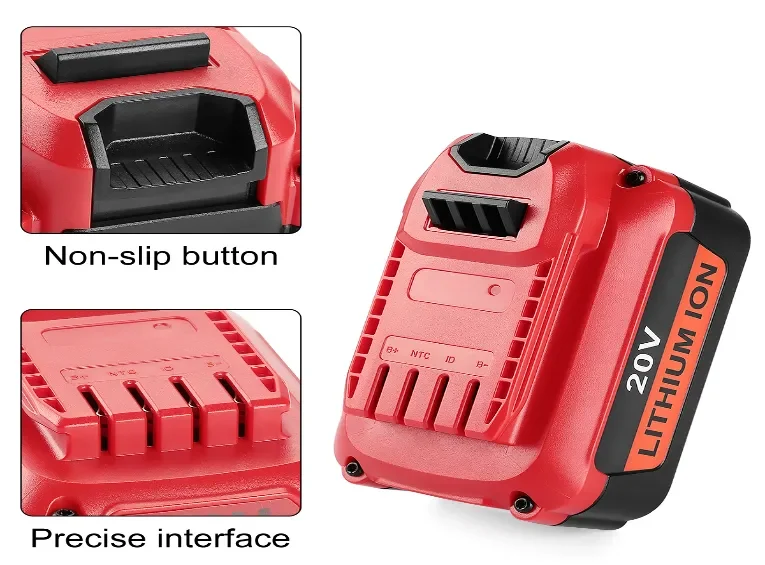
When a replacement battery won’t “wake” a cordless tool, the issue is usually a failed handshake between the tool’s firmware and the pack’s BMS—not dead cells. The tool requests ID/thermistor/auth data; if values, timing, or protocols don’t match (wrong ID resistor, thermistor curve, pin map, EMI, or encrypted auth), power is locked out. Safe fix: never bypass the pack; do OEM swap-tests, log OCV and thermistor readings, scope the handshake, and require vendors to provide mapping and validation in contracts.
Why start with safety before anything else?
Add these safety lines to your SOPs and ensure all technicians acknowledge them.
Never open or bypass a live pack. Always use PPE, insulated tools, and proper ventilation. Do not bridge terminals to “wake” a pack. Firmware-level probing or load tests belong only in certified labs. No handshake issue is worth a bench fire.
How does the tool ↔ pack handshake actually work?
Use this 3-step model to explain handshake logic in your next team briefing.
Modern cordless tools depend on a communication handshake between firmware and BMS:
-
The tool queries the pack for ID or chemistry type.
-
The pack replies with resistor values or EEPROM data (via HDQ/I²C/UART).
-
If readings fall outside the accepted range, the firmware locks out power even if the pack is charged.
This prevents unsafe operation caused by chemistry mismatches but also means minor component differences in aftermarket packs can block activation entirely.
What are the top 10 technical reasons for handshake failure?
Match three failure symptoms from your maintenance records to these root causes.
-
Incorrect or missing ID resistor values
-
Wrong thermistor curve (10 kΩ vs 100 kΩ NTC)
-
Pin mapping errors on clone connectors
-
High contact resistance from oxidation
-
Poor EMI suppression or missing capacitors
-
Unsupported communication protocols
-
Missing pull-up resistors or timing drift
-
Out-of-range initial voltage
-
Encrypted authentication chips not emulated
-
Firmware updates that reject older BMS logic
How can you reproduce and log diagnostics safely?
Run this workflow once and capture readings in a shared test log.
Field triage
-
Swap with a known-good OEM pack.
-
Observe LED or error patterns.
-
Inspect terminals for oxidation.
-
Record open-circuit voltage (OCV) and pack temperature.
Bench testing
-
Measure terminal contact resistance.
-
Check thermistor at 25 °C and 50 °C.
-
Probe ID pins; log resistor/voltage values.
-
Capture handshake waveform via oscilloscope.
-
Perform 10 A / 5 s pulse test (log voltage sag).
-
Cross-test with multiple firmware versions if possible.
What are the fastest mitigation tactics for each stakeholder?
Add the relevant lines below to your maintenance or vendor checklist.
-
Vendors: Match thermistor/ID specs exactly; verify communication timing using OEM reference samples.
-
Fleets: Keep “golden” OEM packs for waveform comparison.
-
Technicians: Clean terminals, label failed packs, and log serials for traceability.
-
Procurement: Require handshake validation reports and BMS disclosure from all suppliers.
What should a proper acceptance test matrix include?
Use this list to structure your vendor acceptance protocol.
-
Mechanical fit and latch tolerance
-
Charger/tool LED response check
-
Thermistor curve match (NTC/PT type)
-
ID resistor or EEPROM validation
-
Load sag ≤ X V at 10 A / 5 s
-
Thermal ΔT ≤ Y °C under load
-
BMS handshake latency and stability verified via oscilloscope
What clauses should procurement add to contracts?
Add this paragraph to your master supply agreement.
Sample Clause: Vendor shall disclose thermistor type, ID resistor mapping, and handshake validation results across all supported firmware versions. Supplier must pass integrated pack + charger acceptance tests (mechanical fit, thermistor mapping, handshake stability, thermal ΔT, load sag) prior to shipment. Any lot failing handshake validation is subject to full replacement or credit. Vendor guarantees ≥ 80 % capacity retention at 500 cycles.
When is a failed handshake beyond repair?
Train technicians to recognize these red flags and stop escalation early.
-
Missing or encrypted ID/authentication chips
-
Repeated EMI instability across batches
-
High internal resistance or degraded cells
When these appear, replacement—not rework—is the only safe and cost-effective option.
How do you make a quick go/no-go decision in the field?
-
Swap with OEM pack.
-
Clean terminals.
-
Measure voltage and thermistor reading.
-
Check handshake signal presence.
-
If handshake fails → bench diagnostics.
-
If failure repeats → escalate via RMA protocol.
What common questions should teams clarify?
Share this short FAQ in your internal knowledge base.
Q: Why does my pack charge but not power the tool?
A: The charger doesn’t require a handshake; the tool does.
Q: Can firmware updates block older batteries?
A: Yes — encryption or timing updates can reject legacy BMS profiles.
Q: Can a locked pack be reset?
A: Not safely; reprogramming voids warranty and risks thermal failure.
What’s the final takeaway for procurement and engineering?
Most “no-trigger” failures come from predictable handshake mismatches — resistor, thermistor, EMI, or encryption — not from bad cells. The fix is disciplined engineering and procurement control: require handshake validation, standardize diagnostics, and include RMA and warranty clauses in every supply agreement. Turning random failures into structured data transforms reactive troubleshooting into predictable quality assurance.